Snicker

The Wall Street Journal on Eric Schmidt's relinquishing his role as CEO:

The new organization is expected to streamline things by "elevating me and having Larry running things day to day," Mr. Schmidt said.

See here at the 1:05 mark:

Hey, I didn't say I had intelligent commentary.

P.S. Schmidt tweeted:

Day-to-day adult supervision no longer needed!

I'm familiar with the term "adult supervision" as it applies to a seasoned manager helping a startup mature, but to me it seems poor style to refer to oneself as the "adult supervision", especially in a public announcement. So what is he, handing the company back to the children now?

I'm going to assume the tweet was hastily worded and what he meant was "I'm no longer needed to serve as the grownup here," which expresses both pride (for getting the company to this point) and humility.

P.P.S. I see he often used the term in jest:

He often joked that he provided “adult supervision,” and was never shy about interrupting the founders at meetings to crystallize a point.

I'm confused, though. The first part of the sentence sounds like he was being self-deprecating. The second sounds like he was at least half-serious.

Seth Godin on self-destructive instructions

He writes:

It's completely valid to come to the conclusion that someone else can't be a worthy audience, conversation partner or otherwise interact with you. You can quietly say to yourself, "this guy is a stiff, I'm never going to be able to please him." But the minute you throw back instructions designed to 'cure' the other person, I fear you're going to get precisely the opposite of what you were hoping for.

(Generally speaking, the word "oh" is so neutral, it's a helpful go to pause while you wait for things to calm down.)

The one that gets me is "Get over it."

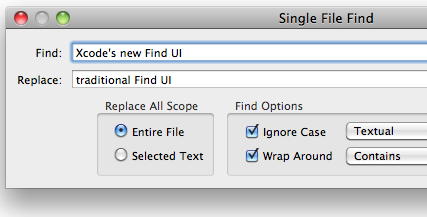
XcodeSFF works

Thanks to Cédric Luthi, I have returned to a sane world where Command-F brings up a Find panel in Xcode.

Cédric pointed me to his fork of XcodeSFF, in response to my complaints about the user interface in Xcode for doing a "Find". I downloaded the source and followed the instructions:

  1. Open XcodeSFF.xcodeproj
  2. Build the project, XcodeSFF.xcplugin will be automatically installed into ~/Library/Application Support/Developer/Shared/Xcode/Plug-ins
  3. Quit Xcode
  4. Relaunch Xcode

There is a known issue that affected me, but again I just followed instructions:

After installing the plugin, you may have to manually set the ⌘F shortcut once in Xcode preferences > Key Bindings > Menu Key Bindings > Edit > Find > Find…

The whole thing only took a few moments. As a side benefit, I have now seen a simple example of an Xcode plugin, which will make it easier to write my own someday if I'm ever so inclined.

P.S. I thought I'd add a few words about what the plug-in does. It finds the "Find…" menu item, which currently exposes the "find banner", and changes its target and action to what they used to be, namely a class called "PBXSimpleFinder" and a method called "showSimpleFind:". If Apple removes PBXSimpleFinder in a future version of Xcode, or modifies it so it no longer implements showSimpleFind:, the plug-in detects this and gracefully becomes a no-op.

Notes from CocoaHeads-NYC, Jan '11

Stuff I either remember or jotted down from last night's meeting, in no particular order.

Links Jon mentioned:

TOMORROW (Saturday): Electronics recycling at Tekserve. See also other dates and locations. I just noticed Tekserve is offering goodies if you come recycle:

Want another reason to come to our recycling events? How ’bout a chance to win a new MacBook Air ($999 value)? As a recycler, you’ll be able to enter the raffle. And that’s not all. You’ll also get:

  • A $25 discount on any Mac, iPad or iPod (except iPod shuffle)
  • Special savings on an eco-friendly 23" LCD monitor from Samsung
  • A coupon for our iconic, organic cotton “I Recycle NY” t-shirt, free with any purchase

The iPhone app Bob mentioned working on is at http://m.thestreet.com.

Screencasts/audiocasts for developers, indie and otherwise:

  • iDeveloper.tv — Cocoa-oriented stuff. Check out the free section and the sample chapters of the non-free offerings. Very professionally done.
  • 5by5 — Lots of series to choose from. I recently discovered The Dev Show. Even if you don't have time to listen/watch, the show notes have lots of interesting links.
  • PeepCode — A good diversity of stuff, including Cocoa and iPhone sections. I bought one of their videos once, but I don't remember the topic.
  • I didn't mention this last night, but Daniel co-hosts a semi-regular (?) podcast called Core Intuition.

Accessorizer, Kevin Callahan's utility for reducing repetitive typing in Xcode.

MarkdownLive — Shows a live HTML preview while you edit a Markdown file. A couple of people have forked this project (including me), but I don't know of anyone making significant enhancements.

WebKit Plug-in Programming Topics — What I showed was a WebKit-based plug-in as opposed to a Netscape-style plugin.

Quick Look Programming Guide — Note to self: Quick Look thumbnails are very different from Quick Look previews.

XcodeSFF — Xcode plug-in that brings back the traditional Find panel. Someone sent me this GitHub link, which is a fork of the main project. I haven't tried either version yet, but will soon. [Update: It works.]

Someone mentioned a trackpad gesture for switching between your .h and .m in Xcode? I couldn't find it.

[Update: I've been informed that the trackpad gesture is to swipe up with three fingers. Works great, but it requires selecting "Swipe to Navigate" in System Preferences, and I prefer using three fingers to drag. So for now I'll stick with the keyboard shortcut, which is Command-Option-Up.]

Paul mentioned that Control-Tab lets you switch between panes if you split your source code view. I'm finding that it actually cycles through a bunch of views in the Xcode window, not just the split panes. Shift-Control-Tab tabs backwards.

Ed strongly encouraged us to report bugs and complaints about Xcode: bugreport.apple.com.

Pizza etiquette: if you are still working on a slice of pizza, do not, as I did, try to get dibs on a second slice.