Who is in charge of Developer Relations?

UPDATE 2021-03-22: Ron Okamoto has retired:

Apple Inc.’s executive in charge of App Store developer relations retired and the role has been taken over by a key marketing executive, according to people familiar with the matter.

[…]

Okamoto’s status as a former employee was disclosed Friday in a witness list provided by Apple to the court for its upcoming trial versus Fortnite developer Epic Games Inc.

[…]

His role has been filled by Susan Prescott, a respected Apple marketing executive who also oversees marketing for Apple’s own apps, services and enterprise initiatives.

(h/t Jeff Johnson)


After reading Manton Reece's blog post about his experiences with the Mac App Store, I realized I did not know who Apple's VP of Developer Relations is. Manton says that to him it seems like nobody's in charge, which made me wonder who is in charge. After some Googling I found out it's Ron Okamoto, formerly of Adobe, hired in 2001 to replace Clent Richardson.

I find it odd that Okamoto is so little known and never discussed. The only recent mentions of him that turned up in Google were about his letter to developers regarding the Mac OS X Download site. He said it would start directing users to the Mac App Store starting January 6. (Note: as of this writing the site still offers direct downloads.)

I would guess the VP of Developer Relations has at least the following responsibilities (in no particular order, and I'm probably wrong about some of them):

  • developer.apple.com in general, including code samples and site design
  • developer registration
  • app submissions, approvals, and rejections
  • the provisioning process for apps to get on the App Store (and now Mac App Store)
  • the documentation group
  • bugreport.apple.com (aka Radar)
  • Technical Support Incidents
  • relationships with high-profile developers
  • WWDC
  • worldwide Tech Talk days
  • John Geleynse's team (Technology Evangelism) and Geleynse himself (User Experience Evangelist) [UPDATE, 2012-05-11: I've learned a bit more about Geleynse.]
  • devforums.apple.com
  • lists.apple.com (almost all the lists are developer-oriented)

That's a lot of territory, and Okamoto's had the job for ten years. Why haven't all the developers who have been angry about one thing or another been angry at him? Conversely, why hasn't he gotten credit for the things that have gone well? Why has Phil Schiller said more in public about iPhone app rejections than Okamoto? Why doesn't Okamoto do interviews or appear at public events?

Maybe Apple only puts people who are SVP's or higher in the spotlight. The spotlight is a harsh place and maybe Okamoto's time is better spent actually managing the people who report to him. Maybe developers, if they even know who he is, aren't angry at him because they feel he's only implementing policies set from above.

Anyway, I'd like to know more about him.

Here's the press release Apple issued when he was hired:

CUPERTINO, California—April 30, 2001—Apple® today announced that Ron Okamoto has joined Apple as vice president of Developer Relations, reporting to Apple CEO Steve Jobs.

“We are thrilled to have Ron leading our developer relations team,” said Steve Jobs, Apple’s CEO. “Ron’s firsthand experience at two successful Mac developers will help Apple to become an even better partner for our third party developers.”

Okamoto was previously vice president of Product Management and Marketing for graphics products at Adobe Systems, where he was responsible for the worldwide marketing and management of many award-winning products including Photoshop, Illustrator and After Effects. Prior to joining Adobe, Okamoto was director of Product Marketing at Macromedia, Inc. Okamoto holds a bachelors of science degree in Business Administration from the University of Southern California.
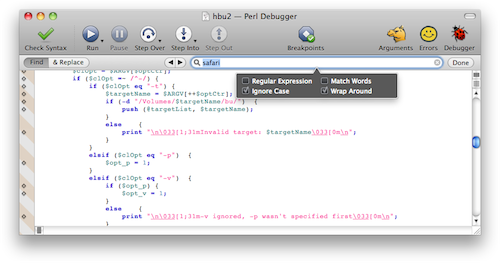
Thoughts on the Find UI

Recently, Xcode departed from the traditional Mac UI for finding a string in the document you are looking at. When you do a Find, Xcode now adds a "find banner" within the document window instead of opening a separate Find panel. The find banner contains a search field and a few controls for specifying the kind of search you want to do. Search is performed incrementally, and matching results are highlighted as you type in the search field.

I'm not crazy about this change and I'm not sure I get the reasoning. I assume one reason for the in-window approach is that a separate Find panel might sometimes appear over your document window, which would get in the way of your seeing the results of the incremental search. But the new approach always removes some of the text you were looking at, and to minimize this loss it's forced to cramp too many controls into a narrow strip.

Mark Alldritt suggests a variation that uses a popover to mitigate the screen real estate problem:

I think this improves on the Xcode implementation, especially if the tab key behaves as I think it should. Currently in Xcode, when you tab out of the search field, focus returns to the main text area and you can resume editing your document. With Mark's popover approach, I would want all the controls in the popover and the find banner to be combined into one big tab loop. You'd hit Escape to resume editing.

The other thing I would want is a single mode for both Find and Find & Replace. It really irks me that the Xcode implementation has different modes for the two operations, because I'm so used to hitting Command-F and being able to do either one.

Besides messing with my muscle memory, Xcode's implementation is keyboard-unfriendly. With the old-school Find panel, I could enter my search text and either hit Return for a simple find, or tab to the Replace All button, which is the kind of replace I usually want to do. In Xcode, I have to use a popup menu to choose Find & Replace mode and I have to use the mouse to click "Replace All", because I can't tab to those buttons.

As a partial workaround, I've assigned Command-Control-F to Find & Replace, which relieves me of having to click the popup, but that's a pain because I have to remember to hit it instead of Command-F like I've done in every other Mac application for decades. For a while I had Command-F as the shortcut for Find & Replace, but since the Xcode documentation window uses the same shortcuts, and it doesn't have Find & Replace, I had to remember to hit the right shortcut for Find when I was in that window. Either way leads to annoyances.

Frankly, what I really want is the traditional Find panel back. It does the right thing in terms of respecting your screen real estate: if it finds a match, it goes away and you are back in your document, ready to edit; if it does not find a match, it selects the whole search field so you can edit it and try again.

I think the Find panel could be modified to support incremental search. It could be translucent so you can see your document underneath it. I usually place it in an out-of-the-way corner of the screen anyway, though granted this is easier on a big screen than on my 11" MBA.

Or maybe the Find panel could do its old non-incremental search, totally the way it used to, and for incremental search (invoked with a different keyboard shortcut) you could get a hovering translucent text field that does case-insensitive plain-text search and nothing else, no options. I wouldn't mind if Xcode came with a preference to apply the incremental search to the symbols in the function popup, perhaps with the kind of fuzzy searching used in PeepOpen, except applied to function names within a file instead of file names.

(Disclaimer: I have not used PeepOpen, only seen its web site.)

(P.S.: I just submitted Radar 8839524 asking for the old Find panel back.)

Mac OS Sex

Erica Sadun has a post over on TUAW explaining the correct pronunciation of "Mac OS X" (it's "mac oh ess ten", not "mac oh ess ex"). Some folks in the comments are not finding themselves able to deal with this.

Yes, Apple is being inconsistent: "Xcode", for example, is pronounced "ex code". And when you see that big "X" there you just want to say "ex". I totally understand. But I also agree with one commenter that there are people who will pronounce it wrong just to annoy. It's like Republicans who refer to the "Democrat party". It's petty and sad, but the best thing is to ignore it.

Anyway, I wonder if Apple missed an opportunity here. If they'd gone with the "ex" pronunciation, the name of their OS would have ended with "sex". They'd have thousands, maybe millions of people saying "sex" every day when referring to their products. Wouldn't that have been perfect subliminal advertising?

On the other hand, there are very good reasons why I am not in marketing.

Bending typography preferences

I've noticed that my habits around spelling, punctuation, and use of whitespace are sometimes dictated by the tools I use rather than what I might otherwise prefer.

A prose example

An example in my prose is that I recently decided to use the British style for quotation marks next to a comma or period.

The American style always puts the comma or period inside the closing quotation mark:

You say "potato," I say "potahto." (American style)

The British style puts the comma or period on the outside when it isn't part of the thing being quoted:

You say "potato", I say "potahto". (British style)

I've been debating for a while whether to switch outright to British style, since I use it when I compose emails about programming, where punctuation characters appear in all sorts of odd places and it's important to be clear when a comma or period is not part of the code I'm quoting. For example, American style would look like this:

To add a level-2 header, type "<h2>," the header text, and "</h2>."

That looks way too much like you're being instructed to type a comma and period. Better is this:

To add a level-2 header, type "<h2>", the header text, and "</h2>".

The thing that convinced me to use British style everywhere, not just for code fragments, was my iPhone. In iOS, when you enter two spaces, it assumes you're ending a sentence and adds a period for you. So you type

That's all<space><space>

and iOS changes that to

That's all.

The problem arises when I end a sentence with a quote. I like to type two spaces between sentences, so I type

He said, "That's all."<space><space>

(note I have to type the "." myself) and iOS proceeds to add an unwanted period:

He said, "That's all.".

By using the British style I can type this:

He said, "That's all"<space><space>

and iOS will give me this:

He said, "That's all".

Maybe this could be fixed with a little added smarts in iOS where it could recognize the American style and not add another period. One of these days I'll file a Radar and see what happens. But for now, it's the perfect excuse for me to commit to British-style punctuation, and it's an example of my tools determining how I punctuate.

[Update: Rats, I just realized the last example above is incorrect, because the period is part of the thing being quoted. In both American and British styles, it should be

He said, "That's all."

So I guess I'll have to file that Radar.]

A coding example

In my personal Cocoa projects, I was thinking of adopting my employer's coding convention for instance variable names:

  • Weak references begin with a "w".
  • Outlets begin with an "o".
  • Everything else begins with an "m" (for "member"; never mind that this is a C++-ism).

Example:

@interface MyViewController : NSViewController
{
@private
    MyViewController * wOwningViewController;
    NSTextField *      oStatusTextField;
    NSMutableArray *   mSubViewControllers;
}
@property (readwrite, assign) IBOutlet NSTextField *statusTextField;
// ...
@end

It's handy to have these typographical reminders that you don't want to release wOwningViewController in your dealloc, and that you don't want to message oStatusTextField anywhere that might be called before the nib is loaded.

But then I got Kevin Callahan's Accessorizer, which is very handy for generating code that is tedious to type by hand, such as property declarations. You can select an ivar declaration and by hitting a couple of hotkeys you'll get the corresponding @property and @synthesize statements.

Accessorizer knows that an ivar name is often the same as a property name, except with a prefix added. For example, you can tell it that "_" is your prefix for ivars and when it sees

NSString *_name;

it will give you

@property (readwrite, copy) NSString * name;

and

@synthesize name = _name;

The problem is, you can only specify one prefix, and my employer's convention uses three different ones: "w", "o", and "m".

Now again, maybe this could be fixed with a little added smarts. There could be an option where Accessorizer assumes the first character, whatever it is, is the prefix. I've emailed Kevin about this, and for all I know this feature will appear someday. But for now I'm sticking with "_" as my prefix for all ivars, which I kind of like anyway.

Other coding examples

Accessorizer isn't the only software that has affected my coding conventions. I've adapted my commenting style (and I think one or two other things) to be compatible with what I get when I hit Reformat in Xcode. Some prominent blogger, I forget who, said he went along with Xcode's formatting — it wasn't worth the effort to prefer something different — and I realized he was right.

I've been on the fence about whether to use spaces or tabs to indent. Part of me leans toward spaces because I might want to copy code into blog entries, and I haven't found a good WordPress plugin for syntax-highlighting code that both handles Objective-C and handles 4-space tabs. Also, I might want to paste some of my code into an email, and most people's email readers will expand tabs to 8 spaces.

Speaking of syntax-highlighting plugins, if I can find the perfect one maybe I'll re-enable “smart quotes” in WordPress. I turned them off because I didn't want curly quotes accidentally showing up in source code that I paste here.

MoreArty

I've been struggling to do something with NSTask which should be simple. To investigate my problem, I wanted to start with a simple working example of NSTask doing its thing. So I downloaded Apple's example project, called Moriarity.

I've complained about Moriarity before.

  • It uses the ancient pbproj project file format, which no recent version of Xcode can open.
  • The code is messy, with inconsistent indentation.
  • It uses the delegate pattern but calls it a controller, and doesn't name the methods like proper delegate methods.
  • It has a page of boilerplate legalese at the beginning of each file, getting between me and the code.
  • It duplicates class descriptions in the .h and .m files, with the only difference being "This is the header for…" vs. "This is the implementation for…".
  • Text-view ivars are named "…TextField".
  • Ivars are declared as id instead of using explicit class names.
  • The init method for TaskWrapper takes one array argument, the first element of which is the command path, instead of taking separate arguments for the command path and the command arguments.
  • TaskWrapper.h and TaskWrapper.m use "Classic Mac" line endings, which screws up diffs in GitX. Unfortunately I only noticed this after I'd already done some commits. In the future when I grab anyone's code with the intention of putting it in Git, I should make sure all the files have Unix line endings.
  • And of course it misspells "Moriarty".

In short, it drives me nuts. This time, though, I did something about it. I created a new project called "MoreArty". I copied all the Moriarity source files and resources, did some cleanup, and posted the code on GitHub. The next time I want to look at a trivial NSTask example, it won't drive me quite so crazy.

I could easily spend a couple of hours cleaning up the comments, but I left them mostly intact, because I don't have time.

I did notice one odd tidbit I hadn't noticed before. In the nib file, the app delegate is named "WatsonController", which I found interesting for historical reasons.