Junked titles

[UPDATE: I heard back from Scotty at iDeveloper TV, and he agrees with my gripe; he just hasn't had a chance to get to it, which is understandable given all he does.]

I agree with almost all of John Gruber's piece on web sites that use terrible page titles. For example, I agree that two good formats are

Source: Headline

as in "Cocoa with Love: Version control for solo Mac developers", and

Headline — Source

as in "Lost in China – NYTimes.com" — although I'd be willing to allow other separating punctuation. Unlike Gruber, I like double colons for separating parts of the title, precisely because they don't occur in ordinary prose. (This site uses "»" for that very reason.) I think either "NYTimes.com :: Lost in China" or "Lost in China :: NYTimes.com" would be fine.

For certain sites, I think another acceptable format would be

Headline on Source

as in "CocoaHeads Atlanta May '09: Aaron Hillegass on the Text System on Vimeo". Apple uses yet another format that I think is fine.

Gruber gives several examples of bad titles, but one case he doesn't mention is when a site junks the concept of a page title altogether, and uses the same title for all pages. One example is iDeveloper.tv. As I've said, I like the site. But every page is titled "iDeveloper TV, Training and Tutorials for OS X and iOS Developers".

This is annoying because if I have several tabs displaying pages on the site, it's impossible to tell which tab contains which page without bringing the tab forward and looking at its contents, which defeats the point of displaying the title in the first place.

Also, I like to archive articles in EagleFiler using a hotkey: I press F5 and the article is archived in the background. When an entire site uses one page title, EagleFiler uses that title as the headline of the article, meaning I have to go into EagleFiler and manually paste in the real headline, which takes away much of the convenience of the hotkey.

I sent feedback to iDeveloper.tv. I hope they'll agree and change the site accordingly.
iDeveloper.tv is great, except…

[UPDATE, 2012-05-18: The free videos have been moved to Vimeo. I've changed the links accordingly.]

I just enjoyed a talk by Dave Dribin called "Clean Code", over on iDeveloper.tv. Although I had heard a lot of Dave's advice before, sometimes in the context of other programming environments, it was good to hear it again well articulated and targeted to a Cocoa and iOS audience. The talk would have been terrific as a CocoaHeads presentation.

Some things I wholeheartedly agreed with:

  • write for people first, computers second
  • delegates > notifications > KVO
  • Boy Scout rule
  • keep methods small (something I strive for, but could do much better with)

The iDeveloper.tv web site is pleasant to navigate and full of good content. I just started up a talk by Aaron Hillegass on "The Many Faces of Data Persistence", and I'm enjoying it so far. I can see myself buying a video one of these days.

That said, there is one thing about the site that bugs me. I'll explain in my next post…

[UPDATE: Three things: (1) I heard back from Scotty at iDeveloper TV, and he agrees with my gripe; he just hasn't had a chance to get to it. (2) Scotty also runs a podcast called iDeveloper Live that I've also been enjoying. (3) I finished watching Aaron's talk and it was great from beginning to end.]

Kod is open source

I came across Kod, a project run by Rasmus Andersson, by way of Daring Fireball:

Kod is a programmers' editor for OS X.

Currently under development, but will soon be available for dare-devil beta testing. "Kod" means "Code" in Swedish.

  • Fully concurrent — loading files, syntax highlighting, etc is distributed across available CPU cores. Minimal waiting time.
  • Integrated scripting environment based on Node.js.
  • Written from scratch with modern OS X 10.6 APIs providing maximum OS integration while avoiding reinvention of the wheel.
  • Sports a Chromium-like user interface where tabs can be torn off and moved between windows.
  • Allows editing (although not saving, currently) remote files accessible over HTTP or HTTPS.
  • Styling of the editor (not only the syntax highlighting) through regular CSS 3.
  • Comes with support for over 65 different languages/syntaxes which can easily be edited or extended (Kod uses the same format as GNU Syntax Highlight).
  • And more awesome features…

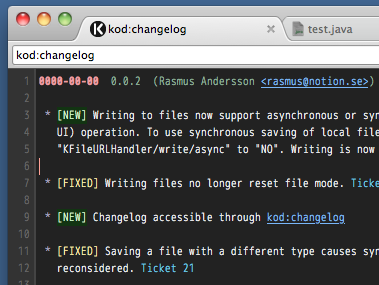
The beta is a real beta, with real flaws, but worth a look. It uses Sparkle for updates, so it's trivial to get new betas as they are released. An interesting UI feature is the use of a browser-like address bar. One use of the address bar is to see a nicely organized, syntax-highlighted change log, which you do by entering "kod:changelog".

kod.png

When you get a Sparkle update a tab with the address "kod:changelog" automatically appears. Similarly, when you select "About Kod" from the app menu, you get a tab with the address "kod:about" that displays contact and licensing information, and third-party credits.

I didn't realize until I joined the mailing list how frustrated people are over the stagnation of TextMate. Kod is emerging in some people's minds as the answer to that, especially now that it's open source, using GitHub for its repository and Lighthouse for bug tracking.

Offhand I don't know of any Mac desktop app this ambitious that's used this open development model. It's been neat watching the discussions over the last few days. Rasmus seems committed to making the best development decisions he can, and providing the high level of leadership such a project will require. I'm optimistic, and surprised the project hasn't gotten more attention. Maybe after the holidays we'll see more about it in the blogs.

"Kod", by the way, is pronounced roughly like "code" in English. I don't know if I can get that Swedish "o" quite right. It sounds like it has a teeny extra syllable at the end.

Is the open source world big enough for two web-inspired Rasmusses? Stay tuned and see.

Thank you, Caroline Rose

Speaking of Inside Macintosh, I love this anecdote from Andy Hertzfeld at folklore.org:

The next week I sat down to meet with Caroline for the first time, and she couldn't have been more different than the previous writer. As soon as I began to explain the first routine, she started bombarding me with questions. She didn't mind admitting it when she didn't understand something, and she wouldn't stop badgering me until she comprehended every nuance. She began to ask me questions that I didn't know the answers to, like what happened when certain parameters were invalid. I had to keep the source code open on the screen of my Lisa when I met with her, so I could figure out the answers to her questions while she was there.

Pretty soon, I figured out that if Caroline had trouble understanding something, it probably meant that the design was flawed. On a number of occasions, I told her to come back tomorrow after she asked a penetrating question, and revised the API to fix the flaw that she had pointed out. I began to imagine her questions when I was coding something new, which made me work harder to get things clearer before I went over them with her.

Initially, we distributed the raw documentation to developers piecemeal, as it was written, but eventually we wanted to collect it into one definitive reference called "Inside Macintosh".

I never heard of Caroline Rose until now, but as far as I am concerned she is an unsung hero in the history of Apple and should be a role model for tech writers everywhere.

You can get a PDF of the 1985 edition of Inside Macintosh here. Skimming through, I'm struck not only by the clarity and thoroughness of the writing, but its consistent tone. It's technical but has a human touch that doesn't feel forced or overly casual.