Switched to Notespark

Thanks to Sho's comment on my post yesterday, I have switched from Appigo's Notebook app to Notespark, by Metaspark.

One thing Notebook does wrong is that it makes you hit an Edit button at the top of the screen to start editing a note. It then scrolls all the way to the bottom of the note and puts the insertion point there. This is especially annoying for me, because I very often want to add stuff to the top of the note, or near the top.

Unlike Notebook, Notespark does almost the right thing, which is that you tap the text to start editing it and the insertion point goes where you tapped. This is what Apple's Notes app does. Unfortunately Notespark doesn't remember where you were scrolled to between launches, as Apple's app does; I've submitted feedback about this to their forums.

Both applications integrate nicely with their respective web apps. What makes Notespark stand out is how it is specifically designed to support shared editing. Multiple users, or the same user logged in multiple times, can make changes to the same note. Notebook supports this too, but the difference is that Notespark will merge everybody's changes instead of blowing away your changes with my newer ones.

If there is a conflict that prevents a merge (for example, if two people make different changes to the same sentence), Notespark makes it easy to either resolve the conflict or fork the note into two notes. Thus it elegantly solves what was by far the hardest problem in my wish list. I can jot a note on my iPhone when I'm on the go, and I can edit the same note on my iMac when I need to do more sophisticated editing.

Here's what the Notespark iPhone app shows you when there is a merge conflict:

notespark-conflict.jpg

And here are your options for resolving the conflict:
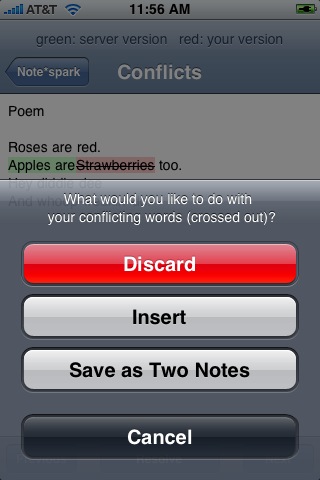
notespark-conflict2.jpg

One thing you can't do with the web interface is edit notes offline. It would be nice if Metaspark told us one day that all our notes are actually in svn, and we could have the option to check files out and use whatever text editor we want. But that might be too much to ask.

I have minor quibbles and I found one bug, all of which I reported on Notespark's forums. Nothing that prevents me from being a happy customer so far.

UPDATE: The folks at Notespark fixed the bug I found.

Toad curl

[UPDATE: Feh. This only works for certain kinds of docs, like Cocoa APIs. I may try to make it work more generally when I get a chance, but it probably works for most of the cases I care about, so I may not bother.]

I wrote a quick and dirty bookmarklet that navigates from a local documentation file to the online ADC version of that file. To get the bookmarklet, drag the following link to your browser's bookmark bar: toadcurl.

To test, use your browser to open the local doc file for, say, NSString. You can easily do this from AppKiDo or the Xcode doc window. Once you have the page displayed, click the "toadcurl" bookmarklet and you should go here.

I sometimes want to do this for two reasons:

  1. I might wonder if the online version is newer; and
  2. I might want to paste the online URL into an email, rather than a file:// URL that might not work for the people I'm emailing to, depending on what version of Xcode they're running and where they have the Dev Tools installed.

I originally named it "toADCurl", since it generates a URL that links to an ADC page, but changed it to all lowercase because I liked the random phrase "toad curl". Of course you can name it whatever you want.

I've only tested with Xcode 3. If it doesn't work for earlier versions, perhaps someone could send me a fix?

It's entirely possible there's already a way to do this that I missed. If so, I'd love to know about it.

What the world needs

Don't ask yourself what the world needs; ask yourself what makes you come alive. And then go and do that. Because what the world needs is people who have come alive. Dr. Howard Thurman

I'd love to know where and when these words were spoken or written. Google turns up a lot of references to the quote but I haven't seen whether Dr. Thurman wrote it in an essay or said it in a speech or what.

Silicone baking mat

baking-mat.png

I have short legs. When I'm sitting and I put a laptop on my lap, it tends to slide off.

To address this, I got a Silpat baking mat to put on my lap, under the laptop. I've only used it a few minutes, but so far it's quite comfortable with excellent grip, and my MacBook Pro hasn't budged.

I don't think the mat is intended as an insulator — indeed, I assume it's supposed to transfer heat from your baking pan to your cookies — but it does protect my legs a little from the heat of the laptop's aluminum bottom.

As an extra bonus, this helps me keep my wrists at a good angle by having the keyboard very low.

I wonder if I'm the first to think of this.